
Samsung S25 Ultra Screen Black or White After Damage – What Does It Mean?
A damaged smartphone display does not always show obvious cracks.
Sometimes a Samsung Galaxy S25 Ultra can still power on, but the screen becomes black, white, partially visible, or divided into abnormal sections. This can make it difficult to tell whether the problem is limited to the display or whether something else inside the phone has been affected.
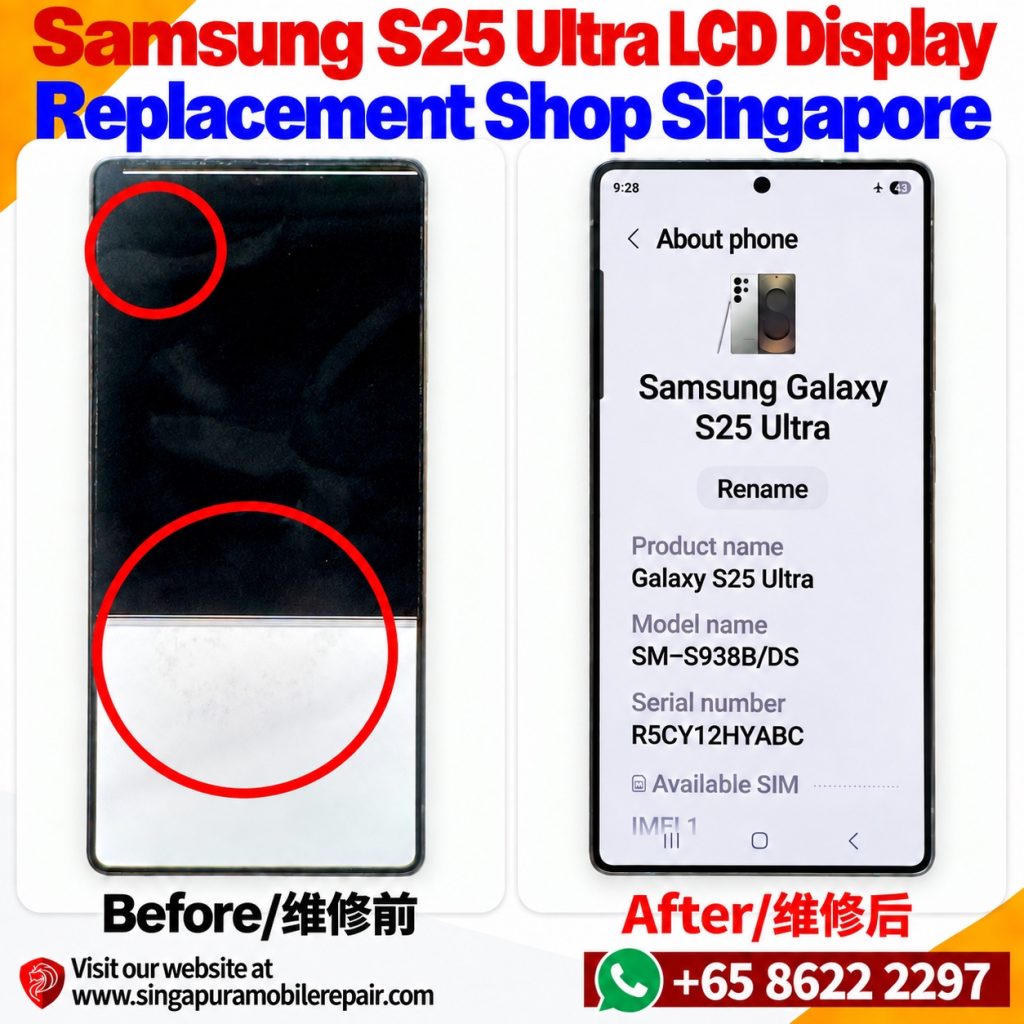
The before-and-after photo in this article shows a real Samsung Galaxy S25 Ultra repair case handled by Singapura Mobile Repair in Singapore.
Before repair, the display was not showing a normal image. A large section appeared black while another area remained bright white. After the appropriate repair, the screen returned to a normal usable display.
So what can symptoms like these mean?
Does your S25 Ultra look similar? Use another phone to take a clear photo of the actual screen, including the black or white areas, and send it to us on WhatsApp.
Send Actual Screen Photos on WhatsApp
Why Is My Samsung S25 Ultra Screen Black but the Phone Still Works?
A phone can continue running even when its display is no longer producing a usable image.
You may still notice vibration, notification sounds, charging activity or other signs that the phone is operating.
This is important because a black screen does not automatically mean the entire phone is dead.
If the problem appeared after a drop, impact, pressure or other physical damage, the display is one area that should be inspected. However, a black screen alone is not enough to identify the failed component with certainty.
Proper diagnosis matters.
Why Is Part of My S25 Ultra Screen White?
Display damage does not always affect the entire screen in exactly the same way.
In this repair case, the screen showed different behaviour across separate areas: a large dark section together with a bright white section.
Other damaged displays may show lines, flickering, abnormal colours, dark patches or areas where the image is missing.
These visible symptoms can provide useful diagnostic clues, particularly when they started immediately after physical damage.
They should not, however, be used to guarantee a diagnosis without checking the phone.
Does a Black Screen Mean My Samsung S25 Ultra Is Dead?
No, not necessarily.
The display is one component of the phone. A malfunctioning or physically damaged display can prevent you from seeing what the device is doing even while other functions continue operating.
Signs that the phone may still be running include:
- Incoming calls or notification sounds
- Vibration
- Charging response
- Alarms
- The device becoming active when buttons are pressed
These observations are useful when explaining the problem to a technician, but they do not replace an inspection.
Can Restarting the S25 Ultra Fix a Black or White Screen?
It depends on the cause.
If an unusual display condition is caused by a temporary software problem, restarting the device may sometimes help.
Physical display damage is different.
If the screen became black, white, distorted or unusable immediately after a drop or impact, restarting the phone cannot physically repair a damaged display component.
Avoid repeatedly forcing restarts if the device has obvious physical damage and the display remains abnormal.
What If There Is No Obvious Crack?
This is an important point.
A display can have a serious problem even when the outer surface does not appear heavily shattered.
The absence of obvious cracked glass does not prove that everything underneath the glass is functioning normally.
If the phone has suffered an impact and the image becomes black, white, distorted or intermittent afterwards, the display system should still be checked.
Should I Keep Using the Phone?
If you can still operate the device safely and see enough of the screen to access your information, backing up important data is sensible.
If the display is largely black or unreadable, avoid blindly entering passwords or repeatedly tapping areas you cannot see.
You should also avoid pressing hard on the display in an attempt to make the image return.
If physical damage is involved, pressure will not repair the damaged component and could make the condition worse.
Real Samsung Galaxy S25 Ultra Before and After Repair
The image accompanying this article shows the actual condition of a Samsung Galaxy S25 Ultra before and after repair.
Before repair, the phone could not display a normal full-screen image. Large black and white areas were clearly visible.
After repair, the display was again able to show the phone information normally.
This example demonstrates why the visible condition of a screen can be useful when diagnosing a phone — but also why the correct repair should be determined from the actual device rather than from a generic symptom list.
What Repair Does My Samsung S25 Ultra Need?
A black, white or abnormal display does not automatically prove that every phone requires exactly the same repair.
The cause and extent of the damage should be established first.
When contacting a repair shop, useful information includes:
- Whether the phone was dropped or hit
- When the display problem started
- Whether the phone still powers on
- Whether you can hear calls or notifications
- Whether touch still responds
- Whether the screen is cracked
- A clear photo showing the display condition
If inspection confirms that your device requires display replacement, you can continue to our dedicated Samsung Galaxy S25 Ultra LCD display replacement service page for the repair-specific information.
That Product Page should remain the main page for customers specifically looking to arrange an S25 Ultra display replacement.
Samsung S25 Ultra Display Problem in Singapore?
If your Galaxy S25 Ultra has developed a black screen, white screen, partial image or another abnormal display condition, contact Singapura Mobile Repair in Singapore.
Tell us what happened and send a clear photo of the screen where possible.
The first objective is to identify what is actually wrong with the phone. Once the fault is established, you can then choose the appropriate repair rather than replacing parts based only on a symptom.
For other faults with this model, browse our Samsung S25 Ultra repair services. Check our shop locations and directions before visiting.
Please send a photo of the whole screen and a close-up of the affected area, taken with another device rather than a screenshot. Tell us what happened, whether the phone still makes sounds and whether touch responds. You can attach the actual photos after opening the WhatsApp chat.
Send Actual Screen Photos on WhatsApp
FAQ
Why is my Samsung S25 Ultra screen black but I can still hear notifications?
The phone itself may still be operating even when the display is unable to show a normal image. The cause should be diagnosed rather than assuming that the entire phone has stopped working.
Why is part of my S25 Ultra screen white?
An abnormal white section can be associated with a display problem, but the visible symptom alone does not establish the exact failed component. The phone should be inspected, particularly if the problem started after physical damage.
Can the screen be damaged without badly cracked glass?
Yes. The visible outer surface does not always reveal the condition of the display components underneath it.
Will restarting fix an S25 Ultra screen damaged after a drop?
Restarting cannot physically repair a damaged display. If the abnormal image started immediately following physical damage, the hardware should be checked.
Does a black screen mean I have lost my data?
Not necessarily. A display problem and data loss are different issues. If the phone is still operating, your data may still be present even though you cannot see the screen normally.
Where should I go if my S25 Ultra needs display replacement?
If diagnosis confirms display damage requiring replacement, use our dedicated Samsung Galaxy S25 Ultra LCD display replacement service page for repair-specific information and to contact Singapura Mobile Repair.