
Xiaomi Redmi Note 15 5G Screen Cracked With Black Spots and Lines – What Does It Mean?
A dropped phone does not always end up with just a small crack in the glass.
Sometimes the phone still turns on, but the screen develops black spots, coloured vertical lines, damaged pixels or large areas that are difficult to see.
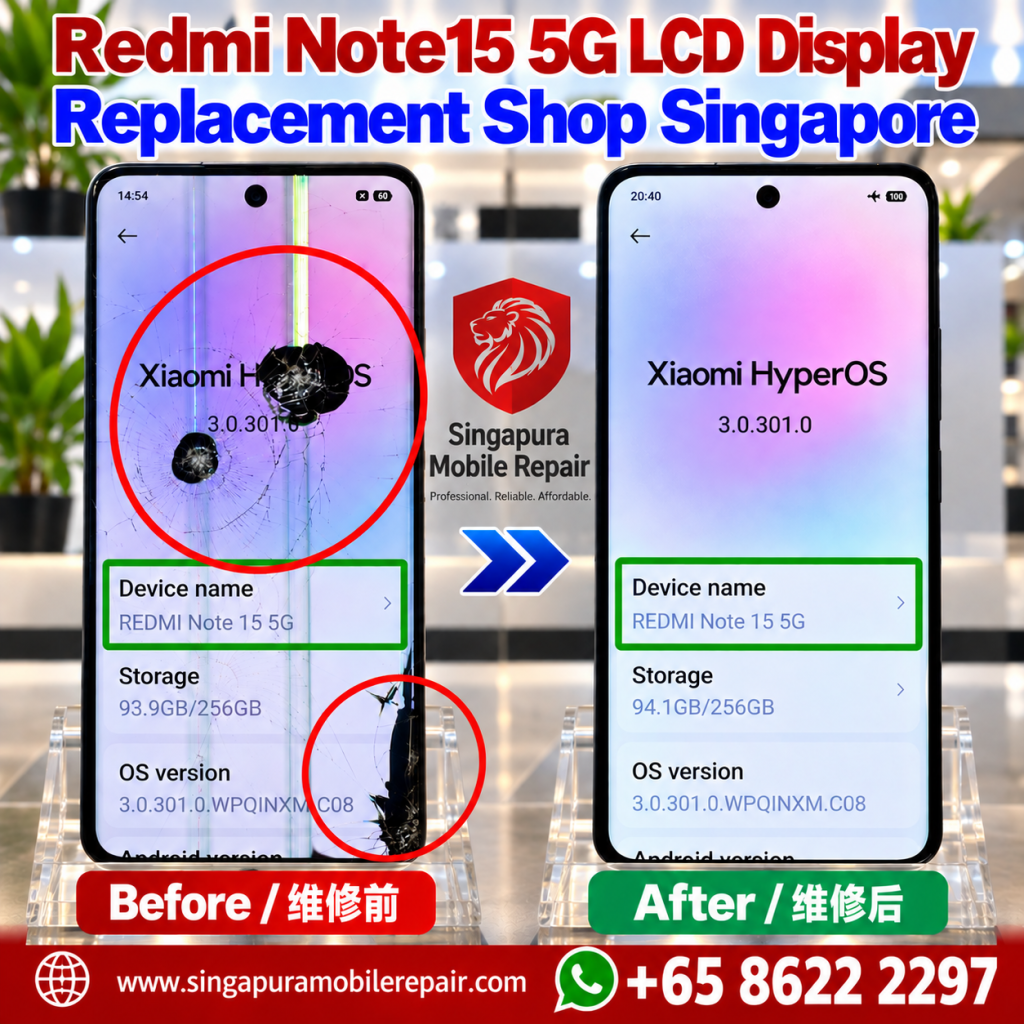
The Redmi Note 15 5G shown in our before-and-after photo is a real example. Before repair, the display had severe physical damage, including cracks, dark damaged areas and vertical lines. The phone was still able to display an image, but the screen was no longer in normal usable condition.
After the appropriate display repair, the screen returned to a clear and normal-looking image.
If your Redmi Note 15 5G looks similar after a drop or impact, understanding the symptoms can help you decide what to do next.
Please use another phone to take a clear photo of your actual Redmi Note 15 5G screen, showing the cracks, black spots or lines, and send it to us on WhatsApp.
Send Actual Damage Photos on WhatsApp
Why Does a Cracked Redmi Note 15 5G Screen Develop Black Spots?
A black area appearing after physical impact can indicate damage beneath the outer surface of the screen.
This is different from a simple superficial scratch.
In the Before photo, there are obvious dark damaged areas together with cracks around the points of impact. When the display panel itself is physically damaged, parts of the screen may stop producing a normal image.
The damaged area may remain small or make a larger portion of the display difficult to use.
Pressing on the black area will not repair the screen and may make physical damage worse.
Why Are There Vertical Lines on the Display?
Another visible symptom in this repair case is the presence of vertical coloured lines.
If lines appear immediately after the phone has been dropped or struck, physical display damage is one possible explanation.
However, a line on a phone screen should not automatically be diagnosed from an online photo alone. Different faults can produce display abnormalities.
The important detail is the complete history of the problem:
Did the lines appear immediately after the impact? Is the glass cracked? Are there black areas? Is touch still working?
Looking at all the symptoms together provides much more useful information than looking at one symptom in isolation.
The Glass Is Cracked but the Phone Still Works. Can I Keep Using It?
A phone can continue to power on even with significant screen damage.
That does not mean the display is in good condition.
For example, you may still be able to unlock the phone or see part of the image while another section has black spots, lines or severe cracking.
Continuing to use a badly damaged display can also become increasingly inconvenient, especially when the damaged area interferes with important information or touchscreen operation.
If the screen has suffered significant physical damage, having the phone inspected is more sensible than repeatedly pressing or bending the damaged area.
Does a Black Spot Mean the Whole Phone Is Broken?
Not necessarily.
A dramatic-looking screen can make the entire device appear badly damaged, but the display is only one part of the phone.
If the Redmi Note 15 5G still powers on and operates, the next step is to determine the extent of the damage rather than assuming the entire phone needs to be replaced.
At the same time, a hard impact can potentially affect more than the screen. An inspection is therefore useful before assuming that display repair is the only work required.
Can Restarting the Redmi Fix Lines or Black Areas?
Restarting a phone can be useful when troubleshooting some software-related display behaviour.
It cannot physically repair a cracked display panel.
If black spots, cracks and coloured lines appeared immediately after physical damage, repeatedly restarting the phone will not reverse a physically broken screen.
The distinction matters because software troubleshooting and physical display repair solve very different problems.
Should I Back Up My Mi Redmi Note 15 5G Before Repair?
If the phone is still usable enough to access your data, keeping an up-to-date backup is a sensible precaution before any device repair.
Important photos, contacts, documents and other personal information should not exist in only one place.
If the screen is too badly damaged to operate the phone normally, avoid repeatedly forcing touch inputs when you cannot clearly see what is happening on the display.
Instead, explain the screen condition when making your repair enquiry.
Real Redmi Note 15 5G Before and After Screen Repair
The image in this article shows an actual Redmi Note 15 5G before and after repair.
Before repair, the phone had:
- Multiple areas of cracked glass
- Large black damaged areas
- Vertical coloured lines
- Significant visible display damage
After the repair, the display was clear again without the previous black areas and vertical lines.
This type of before-and-after comparison helps illustrate the difference between a phone that merely has a cosmetic mark and one where physical damage is visibly affecting the display itself.
How Do I Know What Repair My Redmi Note 15 5G Needs?
Do not choose a repair solely from a symptom list on the internet.
Two phones can appear to have similar symptoms while requiring different diagnosis or repair work.
Useful information to provide includes:
- The exact phone model
- What happened before the problem started
- Whether the screen is physically cracked
- Whether black areas or lines are visible
- Whether touch still works
- Whether the phone still powers on normally
- A clear photo of the damaged display
For customers whose Redmi Note 15 5G has confirmed physical display damage, the next step is to view the dedicated Redmi Note 15 5G LCD display replacement service information or contact Singapura Mobile Repair for an assessment.
That service page should be used for repair-specific information, while this guide is intended to help customers understand the symptoms they may see after screen damage.
Redmi Note 15 5G Screen Damage in Singapore
If you are in Singapore and your Redmi Note 15 5G has developed black spots, vertical lines, cracks or other display problems after an impact, you can contact Singapura Mobile Repair with a clear photo of the damage.
Tell us what happened and what symptoms appeared afterwards.
Rather than guessing from one symptom, the objective is to understand the actual condition of the phone and determine the appropriate next step.
For other issues with this model, browse our Redmi Note 15 5G repair services. Before visiting, check our shop locations and directions.
Send a full-screen photo and a close-up of the affected area, rather than a screenshot. Include your exact model, what happened and whether touch still works. You can attach the photos after opening the WhatsApp chat.
Send Actual Damage Photos on WhatsApp
Frequently Asked Questions
Why does my Redmi Note 15 5G have a black spot after being dropped?
Physical damage to the display can cause areas of the screen to stop displaying a normal image. If the black area appeared together with cracking immediately after an impact, the display should be inspected for physical damage.
Why are coloured lines appearing on my Redmi Note 15 5G screen?
Lines can be associated with display problems, particularly when they appear after physical impact. However, the symptom alone should not be used to diagnose the exact failed component without checking the device.
Can a cracked screen still respond to touch?
Yes. A physically damaged display may continue responding to touch in some areas or even across the whole screen. Working touch does not mean that the display itself is undamaged.
Will restarting the phone remove black spots caused by physical damage?
A restart cannot repair a physically damaged display panel. If the black areas are the result of physical screen damage, hardware repair may be required.
Should I replace my whole phone because the screen is badly damaged?
Not automatically. A severely damaged display does not by itself mean that every part of the phone has failed. The overall condition of the device should be assessed before deciding whether to repair or replace it.
Where can I find the actual Redmi Note 15 5G display repair service?
If your phone requires display repair, continue to the dedicated Redmi Note 15 5G LCD display replacement service page from Singapura Mobile Repair for the service-specific information and repair enquiry.